Time-line Live
Understand live music as it happens
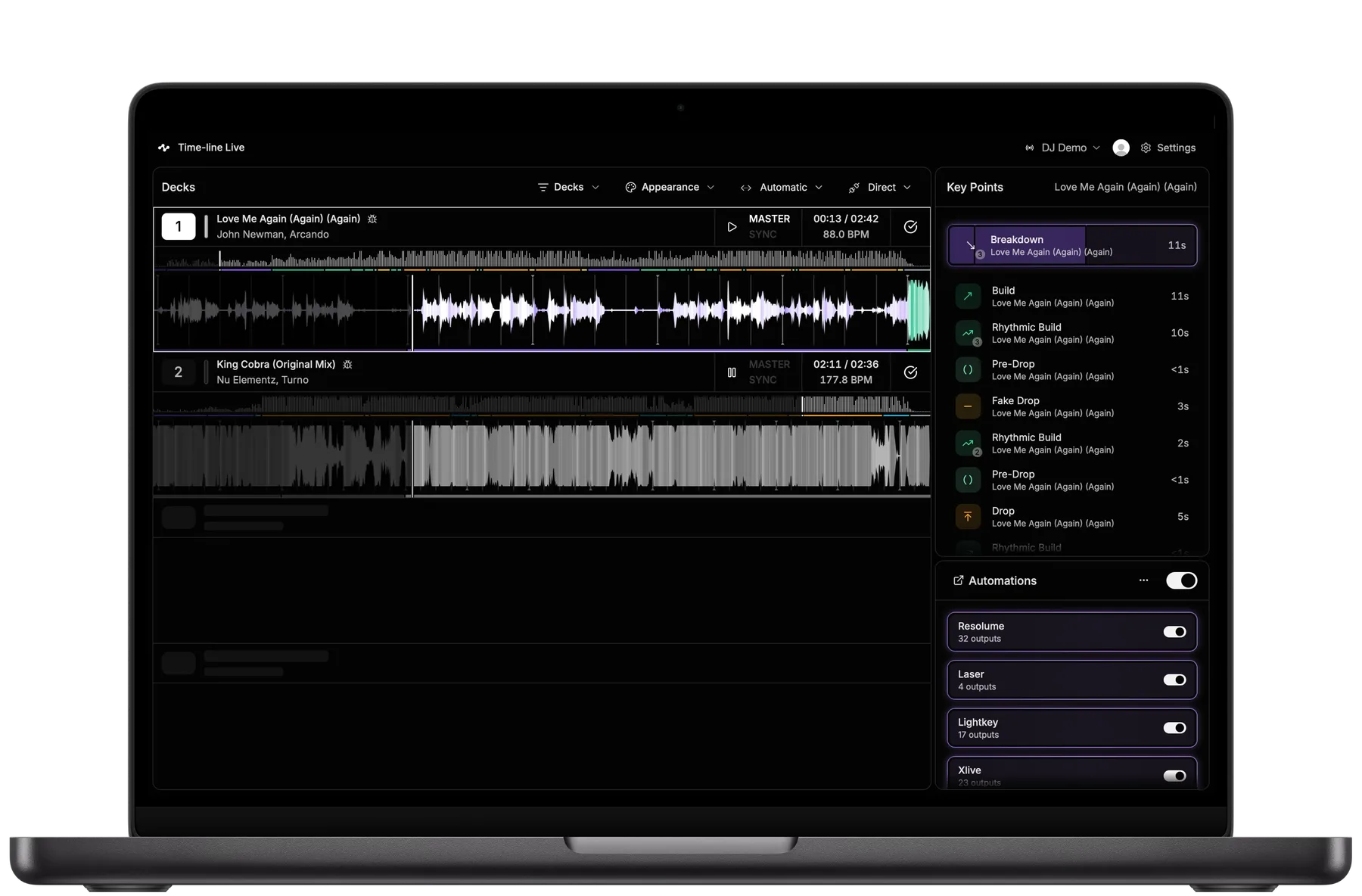
Analyze tracks in real time
Predict upcoming musical events such as builds, breakdowns, drops, breaks, fake drops, and more.
Automate lighting and visuals
Convert detected musical events into OSC and MIDI commands for lighting, visuals, and other show systems.
Run completely offline
Time-line Live runs entirely on your Mac with no internet connection required.
Trusted by
production teams at production teams at


Works with
OSC • MIDI • Node-RED • Ableton Link • Resolume • Unreal Engine • GrandMA • ChamSys
Plans
Join the waitlist to request early access.Available for Apple silicon Macs (M1 or newer).
Free
Included at launch
- Connect to DJ decks
- Monitor decks and waveforms
Pro
Pricing to be announced
- Everything included in Free, plus:
- Predict upcoming musical events in real time (Key Points)
- Automate lighting & visuals via OSC or MIDI
Time-line Live real-time music analysis demo
Silent 23-second walkthrough showing connected DJ decks, live waveforms and BPM, and upcoming Key Points including Builds, Pre-Drops, Drops, Fake Drops and Breakdowns. As playback progresses, Time-line Live updates the timing and upcoming musical structure in real time.
How it works
Connect
Connect a Mac running Time-line Live to the DJ decks via Ethernet.Analyze
Time-line Live analyzes music in real time and identifies important musical moments such as builds, drops and breakdowns — what we call Key Points.*Trigger
Use Node-RED to build custom workflows from musical events and metadata. Output OSC and MIDI commands for lighting consoles, media servers, and other show systems.
*Audio is analyzed locally for music event detection only. Tracks are never uploaded, stored, or shared.
Why Time-line
A new approach to live production
DJ sets don't follow a fixed timeline. Neither should your show.
Time-line Live understands the music as it's being played, so lighting, visuals and other show systems can follow the performance in real time, even when the DJ changes direction.
| Feature | Timecode | Time-line Live |
|---|---|---|
| Live production | Yes | Yes |
| Predict events | No | Yes |
| Adapt to changes | No | Yes |
| DJs can improvise | No | Yes |
Time-line also provides
- Rich real-time event metadata
- Automatic deck transition detection
- Node-RED workflows
- Event-driven OSC/MIDI
| Feature | Traditional timecode | Time-line Live |
|---|---|---|
| Trigger show systems automatically | Yes | Yes |
| Predict upcoming musical events | No | Yes |
| Adapts to live set changes | No | Yes |
| Artists can improvise | No | Yes |
| Rich real-time event metadata | No | Yes |
| Automatic deck transition detection | No | Yes |
| Event-driven OSC/MIDI automation | No | Yes |
| Custom automation workflows via Node-RED | Limited | Yes |
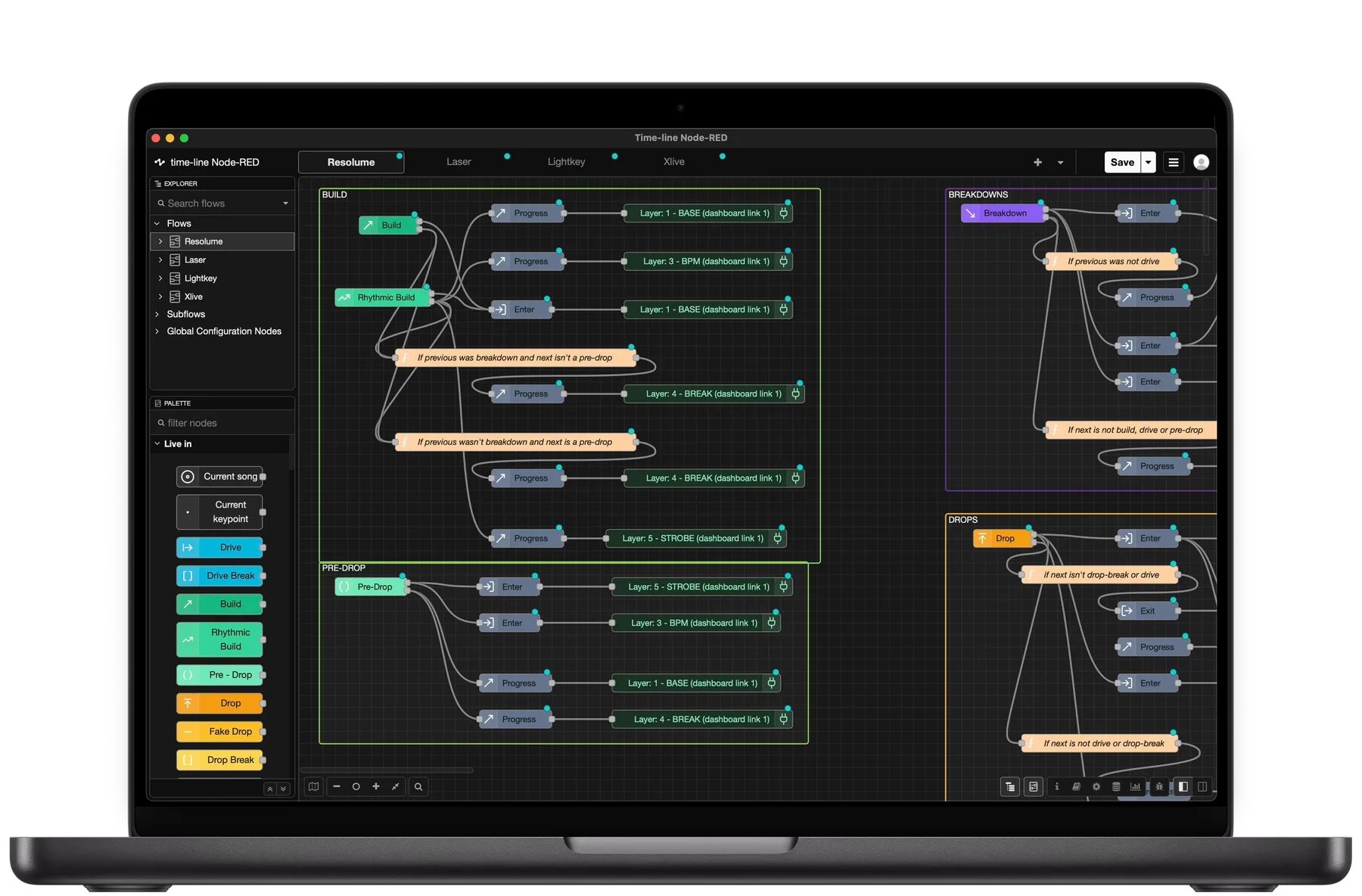
Use Node-Red to map musical metadata to OSC and MIDI. For example, a Rhythmic Build can drive a strobe that ramps up until the drop.
Frequently asked questions
What do I need to run Time-line Live?
Time-line Live requires an Apple Silicon Mac (M1 or newer) connected to your DJ setup. Windows and Intel Macs are not currently supported.
Do I need to prepare tracks in advance?
No. Time-line Live automatically analyzes tracks as they're loaded onto the DJ decks. No preparation or programming is required.
Does Time-line Live require a pre-programmed DJ set or timecode?
No. Time-line Live follows the music as the DJ performs, so the set doesn't need to follow a predetermined timeline. Key Points and automations update as tracks are loaded and played.
How does Time-line Live know which deck to follow?
Auto Switch automatically determines which deck the audience is hearing using information from the DJ equipment together with the musical context of the tracks. You can also override the active deck manually at any time.
Can Time-line Live control lighting and visuals?
Yes. Time-line Live can use musical events and information to drive lighting, visuals, lasers, special effects and other show systems using OSC and MIDI. For more advanced workflows, you can build custom automations with Node-RED.
Can Time-line Live send BPM and beat information?
Yes. Time-line Live can send live BPM and beat information to other show systems. BPM can be sent via OSC, while Ableton Link can synchronize both tempo and beat phase with compatible applications.
What show systems can I connect to Time-line Live?
Time-line Live communicates using OSC and MIDI, so it can work with a wide range of lighting, visual and show-control systems, including grandMA, ChamSys, Resolume, Unreal Engine and TouchDesigner.
Does Time-line Live require an internet connection during a show?
No. Track analysis runs locally on your Mac and music is never uploaded to Time-line's servers. An internet connection is not required for Key Point analysis during a show.